
A Google Sheets Cash Book That Several People Can Spend From
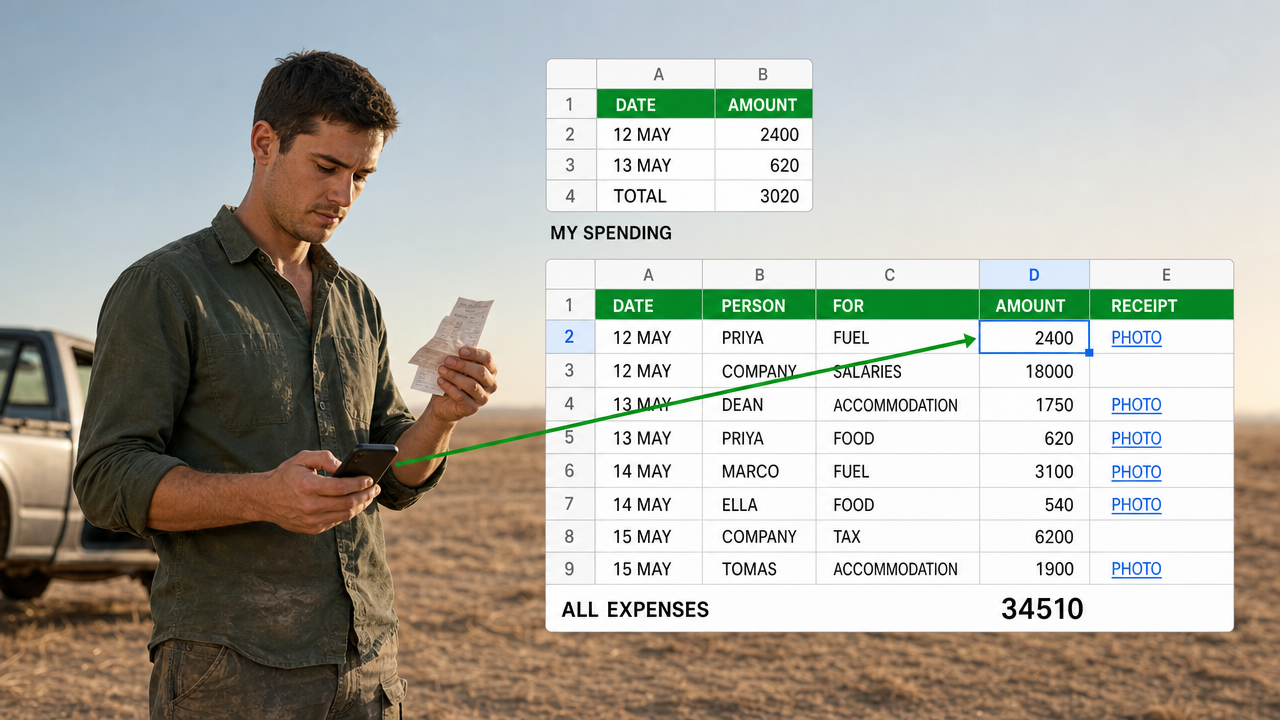
You know what is in the bank. You do not know what is in the vans.
Money left the office this morning as an advance. By tonight some of it is fuel, some of it is a bed for the night, and some of it is still in a pocket. None of it is in your sheet, and it will not be until somebody sits down at a laptop and remembers.
Closing that gap is what a Google Sheets cash book is for. The hard part is not the sheet. It is the five people feeding it.
Everyone’s first answer is a form each
Five people spending, so five forms. One for each. Every form feeds its own sheet, and the dashboard adds the five sheets together.
It works perfectly on the day you build it.
Then somebody joins. Now there is a sixth form to build, a sixth sheet to format, and a dashboard that reaches into five places and has to reach into six. Somebody else leaves, and you cannot delete their form, because a year of their spending sits behind it.
The cost is not the building. It is that the shape of your system now depends on your staff list.
What happens when the office turns out to be the biggest spender
One of these we have built runs a small mining operation. Gold sales, other income, expenses and the cash position in one book, with the entries coming in from phones.
We built it the obvious way first. Five people spending, five expense forms.
Then a correction arrived. Most of the money was not going out through those five people at all. Salaries and tax were paid by the office. What the five actually held was a cash advance, spent on fuel, food and somewhere to sleep.
So the biggest spender in the company was the company, and it had no form.
The quick fix is a sixth form, and we suggested it. It is also the moment you notice you are building a form for something that is not a person.
The unit was never the person. It was the expense.
One form, and the first question is who you are
One expense form. The first question asks who is spending, and the office is one of the options on that list.
Everything else is the same for everybody. What it was for, how much, the date, a photo of the receipt.
One form means one sheet of responses, and every split after that is a formula rather than a form. Per person, per category, per month, per site. Adding a person is adding an option to one question, and the entries that already exist do not care.
We were asked for passwords, so nobody could file an expense under somebody else’s name. Our own view was that a person claiming money back is careful about picking their own name. Then we built something better than a view.
The name question sits on its own page, by itself, before any other question appears. You answer who you are, and only then does the rest of the form open. It costs one extra tap, and it removes the commonest way that answer goes wrong, which is a long dropdown at the bottom of a phone screen in the sun.

What a Google Sheets cash book has to hold in one place
A book of expenses is only half of it. The point of one place is that the balance has to mean something.
So the money model has to be explicit. In this one it is four movements against a single company balance.
- Gold sales and other income credit the company.
- What the office pays out debits it.
- An advance handed to a person debits it on the day it is handed over, not on the day it gets spent.
- Transfers out to shareholders debit it too.
That third one is the one people leave out, and it is the one that makes the balance wrong. Cash in a pocket has already left the company. It is just not fuel yet.
Shareholder percentages were the other thing that refused to sit still. They change month to month, so they cannot be a constant in a formula. They live in their own tab, one row per month, and each split reads the row it belongs to.
Everyone sees their own money and nobody else’s
Every person holding an advance wants the same two numbers. What have I spent, and what is left of what you gave me.
They should not have to ask, and they should not see the whole book to find out.
One constraint decides the design. You cannot publish one tab of a workbook on its own, because publishing is a property of the file. Share the file and you have shared the tab with everybody’s balances on it.
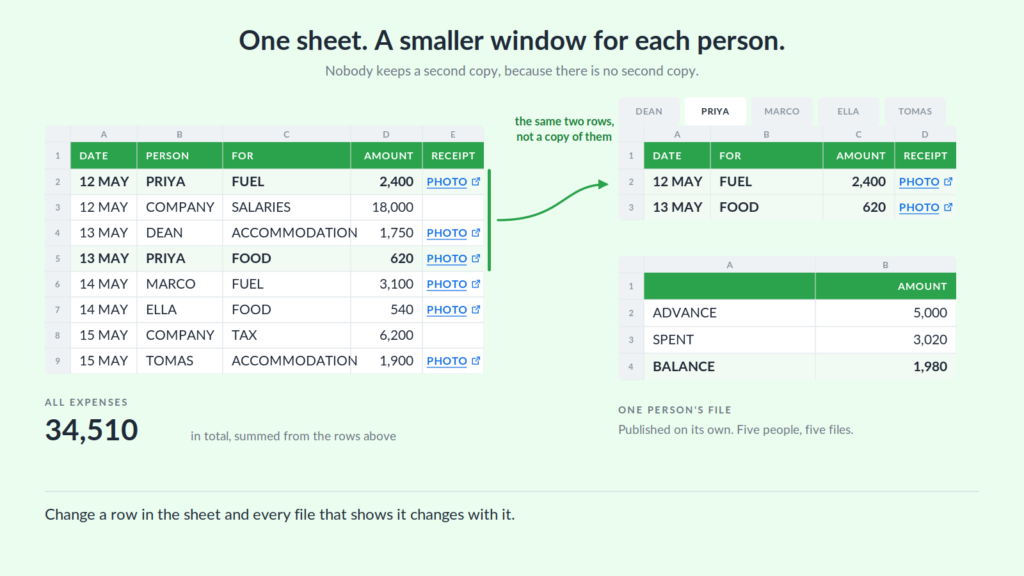
So each person gets their own file. Inside the cash book there is a small sheet per person that pulls their rows out of the expenses sheet. Each of those is mirrored into a separate spreadsheet of its own, kept in its own folder, and those are the files that get published.
Five people, five links, five files that update themselves. Nobody maintains them, because they are not records. They are the same rows, seen through a smaller window.
The one thing we left as a manual edit
There is no admin screen for adding a person. Somebody opens the form and adds an option to one question.
We left it that way on purpose. An admin screen would be a script, and a script can break on a Tuesday when the person who needs it is on a roof. Editing a dropdown needs no training, and the rest of the system keeps working while you do it.
That is only defensible because of the earlier decision. Under the five-form design, adding a person meant building a form from scratch and wiring it into the dashboard. Under this one it is a dropdown, and no formulas move.
Receipts are the other thing left plain. The form takes the photo, stores it, and puts a link to it on the row. The picture does not sit in the cell, and it was never asked to.
Some things really do need their own form
None of this means collapsing everything into one form. It means splitting on the right thing.
We scoped a freight system for the same business, and there the answer went the other way twice.
Vehicles and drivers are two separate registers, because a driver is not attached to a truck. The same truck goes out with a different driver, and one tractor unit pulls a tanker in the morning and a flatbed in the afternoon. Put them in one register and every entry repeats the other.
Departures and returns are two separate entries, because they happen at different times and often to different people. A single form would mean holding a half-finished record open until the truck came back.
The test is not how many kinds of thing you have. It is whether they share a moment and a lifecycle.
Freight services failed that test, so they stayed as one form with a multiple-choice question, exactly as the expenses did. A form for each service would have multiplied every sheet, every formula and every dashboard reference by the number of services.
When nothing identifies a row, make something that does
The whole method rests on pulling the right rows back out, which means every row needs something that names it.
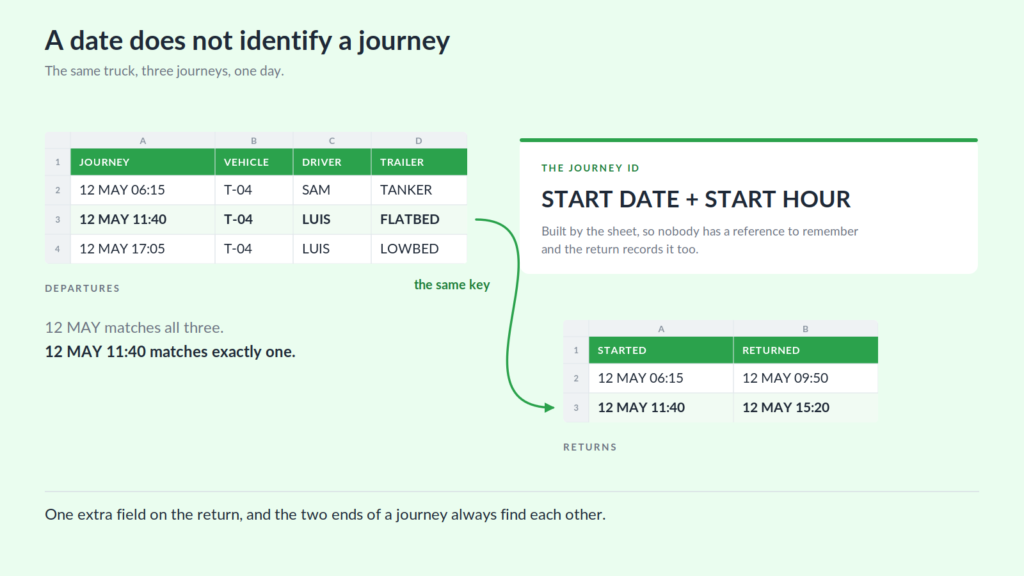
For an expense that is the person. A journey is harder, because it has no obvious name and the date is not enough. The same truck can run three jobs in a day.
So the identifier was built rather than collected. Start date plus start hour, which together are unique for a vehicle, and which the sheet works out for itself.
That decision has a consequence out in the yard. The return has to carry the same key, so it has to record when the journey started, not only when it finished. One extra field on a form, and the two ends of a journey can always find each other.
The important half is that nobody types the identifier. A driver filling in a return has no reference to remember and no code to copy off a sheet. Ask people to type a key and you have built a system that fails quietly, in a column nobody reads.
Where this approach stops working
A published file is a window, not a lock. Anyone holding the link can open it. It keeps people out of each other’s business, but it does not keep out someone determined. If your people genuinely must not see one another’s numbers, you need real accounts and permissions, and that is a different kind of tool.
The split depends on one field being right. Everything downstream of that first question trusts it. Putting the question on its own page makes the mistake rare, not impossible, and nothing in the sheet complains when a row lands in the wrong person’s balance.
Structural changes are not free. Adding a column means changing every formula that reads the table, and on a working book that is all of them. This design makes the people cheap to change, which is the part that changes weekly. It does not make the table cheap to change.
Four checks you can run on your own file
You do not need us for this part. Four questions, answerable in ten minutes with the file you already have.
Count your forms and count your people. If those two numbers are the same, or move together, your structure is tied to your staff list.
Try adding a person on paper. Write down every step. If the list runs past three items, or any item is the word formula, the unit is wrong.
Find the advances. Look for where cash handed to a person leaves the company balance. If it only leaves when they spend it, your balance is overstating what you have by whatever is in their pockets tonight.
Pick one row at random and ask what names it. If the answer is its position in the sheet, then every filter, every total and every per-person view is resting on nothing.
When a spreadsheet is the right answer, and when it is not
A Google Sheets cash book suits a business where a handful of people spend money away from the office, the entries arrive from phones, and the person who needs the balance is the person who owns it. It is quick to change and everybody already knows how to read it.
It stops suiting you when you need audited permissions, approval chains before money moves, or a record that has to satisfy somebody outside the business. If you have reached that point, dedicated accounting software is the better answer, and we will tell you so rather than sell you a sheet.
If you are not there, and you are counting money you cannot see, tell us how many people spend it and what happens today when one of them joins. That is usually enough for us to say whether this is a week of work or an afternoon.
Keep reading
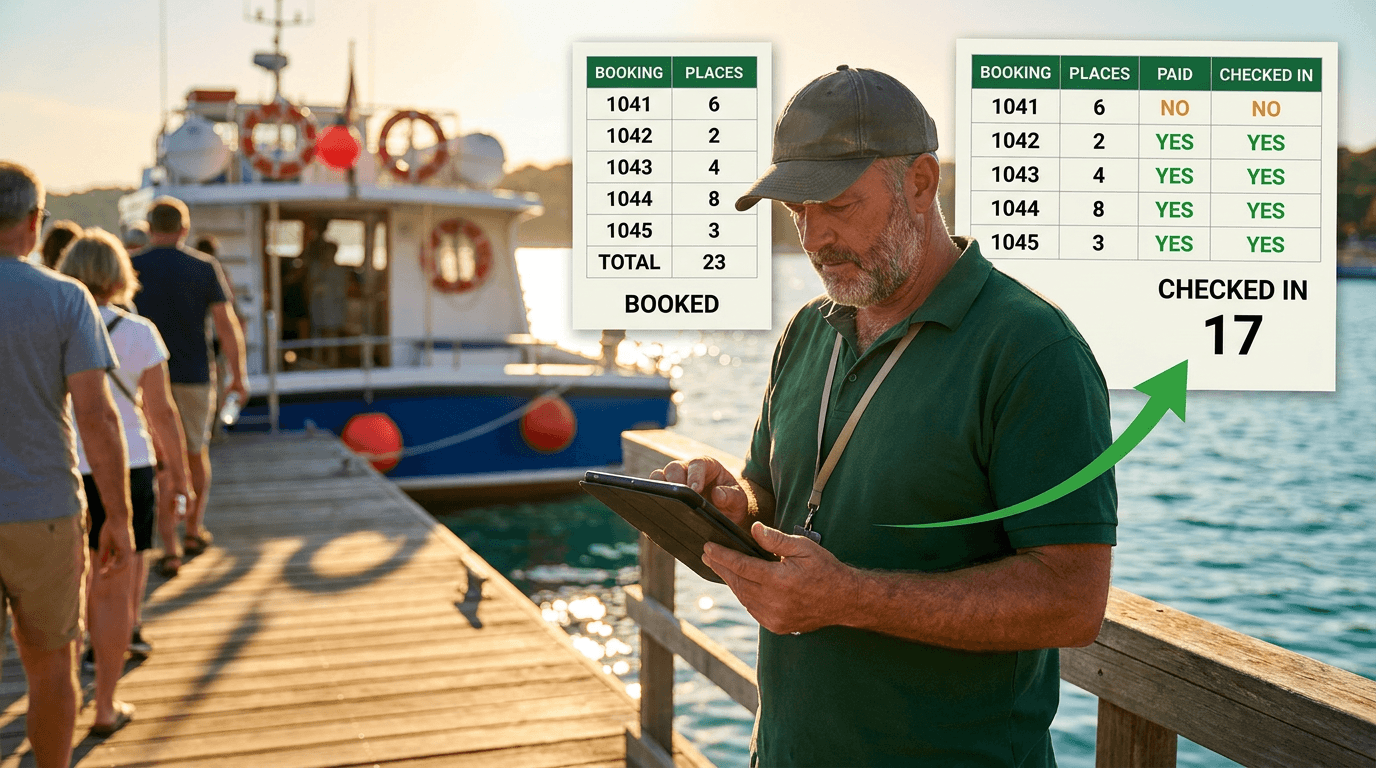
A Google Sheets Booking System That Counts Who Actually Turned Up
Six places booked, four people aboard. A booking sheet that records only the promise is measuring your intentions.…
Tracking Hundreds of Jobs Through Stages in One Spreadsheet
A tab for every stage drifts within a fortnight. Keep one table instead, and let every list be…
Tracking Parts Inventory When Your Products Share Components
Store platforms count products. When many products share the same parts, counting products tells you nothing about what…
Want this built for your team?
Book a free 30-minute discovery call. We will map the system before you commit to anything.